JtoggleButton Programador Java Interfaz Gráfico GUI AWT Swing 1 Swing 2
|
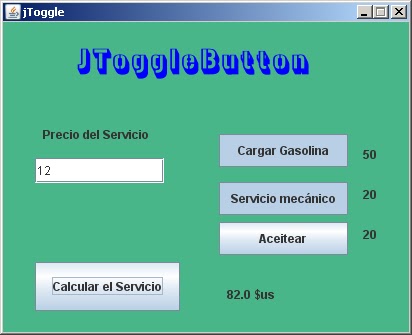 |
java.awt.*; java.awt.event.*; javax.swing.*; javax.swing.event.*; public class jToggle extends JFrame { private JLabel jLabel1 = new JLabel(); private JLabel jLabel2 = new JLabel(); private JLabel jLabel3 = new JLabel(); private JLabel jLabel4 = new JLabel(); private JLabel jLabel5 = new JLabel(); private JLabel jLabel6 = new JLabel(); private JTextField jTextField1 = new JTextField(); private JToggleButton jToggleButton1 = new JToggleButton(); private JToggleButton jToggleButton2 = new JToggleButton(); private JToggleButton jToggleButton3 = new JToggleButton(); private JButton jButton1 = new JButton(); public jToggle(String title) { super(title); setDefaultCloseOperation(WindowConstants.DISPOSE_ON_CLOSE); int frameWidth = 412; int frameHeight = 335; setSize(frameWidth, frameHeight); Dimension d = Toolkit.getDefaultToolkit().getScreenSize(); int x = (d.width - getSize().width) / 2; int y = (d.height - getSize().height) / 2; setLocation(x, y); setResizable(false); Container cp = getContentPane(); cp.setLayout(null); jLabel1.setBounds(360, 120, 59, 25); jLabel1.setText("50"); cp.add(jLabel1); jLabel2.setBounds(360, 160, 51, 25); jLabel2.setText("20"); cp.add(jLabel2); jLabel3.setBounds(360, 200, 59, 25); jLabel3.setText("20"); cp.add(jLabel3); jLabel4.setBounds(224, 256, 123, 33); jLabel4.setText(""); cp.add(jLabel4); jLabel5.setBounds(72, 16, 251, 49); jLabel5.setText("JToggleButton"); jLabel5.setFont(new Font("Gunplay 3D", Font.BOLD, 36)); jLabel5.setForeground(Color.BLUE); cp.add(jLabel5); jLabel6.setBounds(40, 96, 139, 33); jLabel6.setText("Precio del Servicio"); cp.add(jLabel6); jTextField1.setBounds(32, 136, 129, 25); cp.add(jTextField1); cp.setBackground(new Color(0x49B68A)); jToggleButton1.setBounds(216, 112, 129, 33); jToggleButton1.setText("Cargar Gasolina"); jToggleButton1.setMargin(new Insets(2, 2, 2, 2)); jToggleButton1.addActionListener(new ActionListener() { public void actionPerformed(ActionEvent evt) { jToggleButton1_ActionPerformed(evt); } }); cp.add(jToggleButton1); jToggleButton2.setBounds(216, 160, 129, 33); jToggleButton2.setText("Servicio mecánico"); jToggleButton2.setMargin(new Insets(2, 2, 2, 2)); jToggleButton2.addActionListener(new ActionListener() { public void actionPerformed(ActionEvent evt) { jToggleButton2_ActionPerformed(evt); } }); cp.add(jToggleButton2); jToggleButton3.setBounds(216, 200, 129, 33); jToggleButton3.setText("Aceitear"); jToggleButton3.setMargin(new Insets(2, 2, 2, 2)); jToggleButton3.addActionListener(new ActionListener() { public void actionPerformed(ActionEvent evt) { jToggleButton3_ActionPerformed(evt); } }); cp.add(jToggleButton3); jButton1.setBounds(32, 240, 145, 49); jButton1.setText("Calcular el Servicio"); jButton1.setMargin(new Insets(2, 2, 2, 2)); jButton1.addActionListener(new ActionListener() { public void actionPerformed(ActionEvent evt) { jButton1_ActionPerformed(evt); } }); cp.add(jButton1); setVisible(true); } public void jToggleButton1_ActionPerformed(ActionEvent evt) { } public void jToggleButton2_ActionPerformed(ActionEvent evt) { } public void jToggleButton3_ActionPerformed(ActionEvent evt) { } public void jButton1_ActionPerformed(ActionEvent evt) { double precio_base; double precio_instal; double precio_for; double precio_ali; precio_base = Double.parseDouble(jTextField1.getText()); precio_instal = Double.parseDouble(jLabel1.getText()); precio_for = Double.parseDouble(jLabel2.getText()); precio_ali = Double.parseDouble(jLabel3.getText()); double precio_total; precio_total = precio_base; if (jToggleButton1.isSelected()) { precio_total = precio_total+precio_instal; } if (jToggleButton2.isSelected()) { precio_total = precio_total+precio_for; } if (jToggleButton3.isSelected()) { precio_total = precio_total+precio_ali; } jLabel4.setText(precio_total+" $us"); } public static void main(String[] args) { new jToggle("jToggle"); } } |
Mostrando entradas con la etiqueta Programador Java GUI Swing. Mostrar todas las entradas
Mostrando entradas con la etiqueta Programador Java GUI Swing. Mostrar todas las entradas
domingo, 24 de febrero de 2013
JtoggleButton Programador Java Interfaz Gráfico GUI AWT Swing 1 Swing 2

JcomboBox Modelo Programador Java Interfaz Gráfico GUI AWT Swing 1 Swing 2
| JcomboBox Modelo Programador Java Interfaz Gráfico GUI AWT Swing 1 Swing 2 |
 |
java.awt.*; java.awt.event.*; javax.swing.*; javax.swing.event.*; public class JcomboBox1 extends JFrame { private JLabel jLabel1 = new JLabel(); private JComboBox jComboBox1 = new JComboBox(); private JButton Pares = new JButton(); private ImageIcon ParesIcon = new ImageIcon("../../A.png"); private JButton jButton2 = new JButton(); private ImageIcon jButton2Icon = new ImageIcon("../../Apa.png"); private ImageIcon jButton2SelectedIcon = new ImageIcon("../../Ap2.png"); private JLabel jLabel2 = new JLabel(); public JcomboBox1(String title) { super(title); setDefaultCloseOperation(WindowConstants.DISPOSE_ON_CLOSE); int frameWidth = 337; int frameHeight = 338; setSize(frameWidth, frameHeight); Dimension d = Toolkit.getDefaultToolkit().getScreenSize(); int x = (d.width - getSize().width) / 2; int y = (d.height - getSize().height) / 2; setLocation(x, y); setResizable(false); Container cp = getContentPane(); cp.setLayout(null); jLabel1.setBounds(8, 0, 307, 89); jLabel1.setText("Cuadro de Listas jComboBox"); jLabel1.setFont(new Font("Gunplay 3D", Font.BOLD, 22)); jLabel1.setForeground(Color.MAGENTA); cp.add(jLabel1); cp.setBackground(new Color(0x4FB09D)); jComboBox1.setBounds(32, 104, 153, 25); cp.add(jComboBox1); Pares.setBounds(208, 120, 121, 41); Pares.setText("Pares"); Pares.setMargin(new Insets(2, 2, 2, 2)); Pares.addActionListener(new ActionListener() { public void actionPerformed(ActionEvent evt) { Pares_ActionPerformed(evt); } }); Pares.setIcon(ParesIcon); cp.add(Pares); jButton2.setBounds(208, 184, 121, 41); jButton2.setText("Impares"); jButton2.setMargin(new Insets(2, 2, 2, 2)); jButton2.addActionListener(new ActionListener() { public void actionPerformed(ActionEvent evt) { jButton2_ActionPerformed(evt); } }); jButton2.setSelectedIcon(jButton2SelectedIcon); jButton2.setIcon(jButton2Icon); cp.add(jButton2); jLabel2.setBounds(24, 240, 195, 33); jLabel2.setText(""); cp.add(jLabel2); jComboBox1.addActionListener(new ActionListener() { public void actionPerformed(ActionEvent evt) { jComboBox1_ActionPerformed(evt); } }); setVisible(true); } // end of public JcomboBox1 public void jComboBox1_ActionPerformed(ActionEvent evt) { jLabel2.setText(jComboBox1.getSelectedItem().toString()); } public void Pares_ActionPerformed(ActionEvent evt) { int i; DefaultComboBoxModel modelo = new DefaultComboBoxModel(); for (i=0;i<10;i+=2) { modelo.addElement("Nº "+i); } jComboBox1.setModel(modelo); } public void jButton2_ActionPerformed(ActionEvent evt) { int i; DefaultComboBoxModel modelo = new DefaultComboBoxModel(); for (i=1;i<10;i+=2) { modelo.addElement("Nº "+i); } jComboBox1.setModel(modelo); } public static void main(String[] args) { new JcomboBox1("JcomboBox1"); } } |
JList Modelo Programador Java Interfaz Gráfico GUI AWT Swing 1 Swing 2
JList Modelo Programador Java Interfaz Gráfico GUI AWT Swing 1 Swing 2
|
 |
java.awt.*; java.awt.event.*; javax.swing.*; javax.swing.event.*; public class jlist1 extends JFrame { private JButton jButton1 = new JButton(); private ImageIcon jButton1Icon = new ImageIcon("../../Apons/im.png"); private JButton jButton2 = new JButton(); private ImageIcon jButton2Icon = new ImageIcon("../../Aons/di.png"); private JLabel jLabel1 = new JLabel(); private JLabel jLabel2 = new JLabel(); private JList jList1 = new JList(); private DefaultListModel jList1Model = new DefaultListModel(); private JScrollPane jList1ScrollPane = new JScrollPane(jList1); public jlist1(String title) { super(title); setDefaultCloseOperation(WindowConstants.DISPOSE_ON_CLOSE); int frameWidth = 371; int frameHeight = 367; setSize(frameWidth, frameHeight); Dimension d = Toolkit.getDefaultToolkit().getScreenSize(); int x = (d.width - getSize().width) / 2; int y = (d.height - getSize().height) / 2; setLocation(x, y); setResizable(false); Container cp = getContentPane(); cp.setLayout(null); jButton1.setBounds(200, 120, 113, 41); jButton1.setText("Grupo 1"); jButton1.setMargin(new Insets(2, 2, 2, 2)); jButton1.addActionListener(new ActionListener() { public void actionPerformed(ActionEvent evt) { jButton1_ActionPerformed(evt); } }); jButton1.setIcon(jButton1Icon); cp.add(jButton1); jButton2.setBounds(200, 184, 113, 41); jButton2.setText("Grupo 2"); jButton2.setMargin(new Insets(2, 2, 2, 2)); jButton2.addActionListener(new ActionListener() { public void actionPerformed(ActionEvent evt) { jButton2_ActionPerformed(evt); } }); jButton2.setIcon(jButton2Icon); cp.add(jButton2); jLabel1.setBounds(40, 16, 291, 53); jLabel1.setText("JList modelo"); jLabel1.setForeground(Color.MAGENTA); jLabel1.setFont(new Font("Gunplay 3D", Font.BOLD, 48)); cp.add(jLabel1); jLabel2.setBounds(64, 256, 195, 41); jLabel2.setText("text"); cp.add(jLabel2); jList1.setModel(jList1Model); jList1ScrollPane.setBounds(24, 80, 137, 161); jList1Model.addElement("Real Madrid"); jList1Model.addElement("Barcelona"); jList1Model.addElement("Boca"); cp.add(jList1ScrollPane); jList1.addMouseListener(new MouseAdapter() { public void mouseClicked (MouseEvent evt) { jList1_mouseClicked(evt); } }); cp.setBackground(new Color(0x34CB5A)); setVisible(true); } public void jList1_mouseClicked(MouseEvent evt) { jLabel2.setText(jList1.getSelectedValue().toString()); } public void jButton1_ActionPerformed(ActionEvent evt) { DefaultListModel modelo = new DefaultListModel(); modelo.addElement("Chelse"); modelo.addElement("Juventus"); modelo.addElement("Milan"); jList1.setModel(modelo); } public void jButton2_ActionPerformed(ActionEvent evt) { DefaultListModel modelo = new DefaultListModel(); modelo.addElement("Real Madrid"); modelo.addElement("Barcelona"); modelo.addElement("Boca"); jList1.setModel(modelo); } public static void main(String[] args) { new jlist1("jlist1"); } } |
domingo, 17 de febrero de 2013
JList Programador Java Interfaz Gráfico GUI AWT Swing 1 Swing 2
Programador Java Interfaz Gráfico GUI AWT Swing 1 Swing 2
| JList Java Interfaz Gráfico GUI AWT Swing 1 Swing 2 |
 |
import java.awt.*; import java.awt.event.*; import javax.swing.*; import javax.swing.event.*; public class Jlist extends JFrame { private JLabel jLabel1 = new JLabel(); private JList jList1 = new JList(); private DefaultListModel jList1Model = new DefaultListModel(); private JScrollPane jList1ScrollPane = new JScrollPane(jList1); private JLabel jLabel2 = new JLabel(); private JButton jButton1 = new JButton(); private ImageIcon jButton1Icon = new ImageIcon("../../la.png"); public Jlist(String title) { super(title); setDefaultCloseOperation(WindowConstants.DISPOSE_ON_CLOSE); int frameWidth = 300; int frameHeight = 300; setSize(frameWidth, frameHeight); Dimension d = Toolkit.getDefaultToolkit().getScreenSize(); int x = (d.width - getSize().width) / 2; int y = (d.height - getSize().height) / 2; setLocation(x, y); setResizable(false); Container cp = getContentPane(); cp.setLayout(null); cp.setBackground(new Color(0x34CB5A)); jLabel1.setBounds(72, 8, 147, 57); jLabel1.setText("JList"); jLabel1.setForeground(Color.CYAN); jLabel1.setFont(new Font("3D", Font.BOLD, 48)); cp.add(jLabel1); jList1.setModel(jList1Model); jList1ScrollPane.setBounds(48, 56, 169, 137); jList1Model.addElement("Rojo"); jList1Model.addElement("Amarillo"); jList1Model.addElement("Verde"); cp.add(jList1ScrollPane); jLabel2.setBounds(32, 208, 227, 25); jLabel2.setText("Selección de Color:"); cp.add(jLabel2); jButton1.setBounds(104, 232, 113, 49); jButton1.setText("OK"); jButton1.setMargin(new Insets(2, 2, 2, 2)); jButton1.addActionListener(new ActionListener() { public void actionPerformed(ActionEvent evt) { jButton1_ActionPerformed(evt); } }); jButton1.setIcon(jButton1Icon); cp.add(jButton1); setVisible(true); } public void jButton1_ActionPerformed(ActionEvent evt) { String mensaje; if (jList1.getSelectedIndex()==-1) { mensaje="No Seleccionaste un Color."; } else { mensaje="Color seleccionado es: "+jList1.getSelectedValue().toString(); } jLabel2.setText(mensaje); } public static void main(String[] args) { new Jlist("Jlist"); } } |
JComboBox Programador Java Interfaz Gráfico GUI AWT Swing 1 Swing 2
| JComboBox GUI AWT Swing 1 Swing 2 |
 |
import java.awt.*; import java.awt.event.*; import javax.swing.*; import javax.swing.event.*; public class Jcombobox extends JFrame { private JComboBox jComboBox1 = new JComboBox(); private JLabel jLabel1 = new JLabel(); private JLabel jLabel2 = new JLabel(); public Jcombobox(String title) { super(title); setDefaultCloseOperation(WindowConstants.DISPOSE_ON_CLOSE); int frameWidth = 300; int frameHeight = 300; setSize(frameWidth, frameHeight); Dimension d = Toolkit.getDefaultToolkit().getScreenSize(); int x = (d.width - getSize().width) / 2; int y = (d.height - getSize().height) / 2; setLocation(x, y); setResizable(false); Container cp = getContentPane(); cp.setLayout(null); cp.setBackground(new Color(0x38C772)); jComboBox1.setBounds(40, 88, 177, 41); jComboBox1.setModel(new DefaultComboBoxModel(new String[] {"Rojo ", "Amarillo", "Verde"})); jComboBox1.setEditable(false); jComboBox1.setEnabled(true); jComboBox1.setSelectedIndex(1); cp.add(jComboBox1); jLabel1.setBounds(48, 8, 171, 57); jLabel1.setText("JComboBox"); jComboBox1.addActionListener(new ActionListener() { public void actionPerformed(ActionEvent evt) { jComboBox1_actionPerformed(evt); } }); jLabel1.setOpaque(false); jLabel1.setForeground(Color.RED); jLabel1.setFont(new Font("3D", Font.BOLD, 28)); cp.add(jLabel1); jLabel2.setBounds(32, 168, 235, 41); jLabel2.setText("Color:"); cp.add(jLabel2); setUndecorated(false); setVisible(true); } public void jComboBox1_actionPerformed(ActionEvent evt){ String mensaje="Color Seleccionado es "; mensaje=mensaje+jComboBox1.getSelectedItem().toString(); jLabel2.setText(mensaje); } public static void main(String[] args) { new Jcombobox("Jcombobox"); } } |
JRadioButton Programador Java Interfaz Gráfico GUI AWT Swing 1 Swing 2
| JRadioButton Java Interfaz Gráfico GUI AWT Swing 1 Swing 2 |
 |
import java.awt.*; import java.awt.event.*; import javax.swing.*; import javax.swing.event.*; public class jradiobutton extends Frame { private JLabel jLabel1 = new JLabel(); private JPanel jPanel1 = new JPanel(null, true); private JRadioButton jRadioButton1 = new JRadioButton(); private JRadioButton jRadioButton2 = new JRadioButton(); private JRadioButton jRadioButton3 = new JRadioButton(); private JLabel jLabel2 = new JLabel(); private JButton jButton1 = new JButton(); private ImageIcon jButton1Icon = new ImageIcon("../../gra.png"); public jradiobutton(String title) { super(title); addWindowListener(new WindowAdapter() { public void windowClosing(WindowEvent evt) { dispose(); } }); int frameWidth = 326; int frameHeight = 329; setSize(frameWidth, frameHeight); Dimension d = Toolkit.getDefaultToolkit().getScreenSize(); int x = (d.width - getSize().width) / 2; int y = (d.height - getSize().height) / 2; setLocation(x, y); setResizable(false); Panel cp = new Panel(null); add(cp); cp.setBackground(new Color(0x39C64F)); jLabel1.setBounds(24, 0, 232, 65); jLabel1.setText("JRadioButton"); jLabel1.setFont(new Font("3D", Font.BOLD, 36)); jLabel1.setForeground(Color.CYAN); cp.add(jLabel1); jPanel1.setBounds(24, 64, 233, 137); jPanel1.setOpaque(false); jPanel1.setBorder(BorderFactory.createEtchedBorder(0, Color.BLACK, Color.BLACK)); jPanel1.setToolTipText(""); cp.add(jPanel1); jRadioButton1.setBounds(32, 16, 105, 25); jRadioButton1.setText("Rojo"); jRadioButton1.setOpaque(false); jPanel1.add(jRadioButton1); jRadioButton2.setBounds(32, 56, 97, 25); jRadioButton2.setText("Amarillo"); jRadioButton2.setOpaque(false); jPanel1.add(jRadioButton2); jRadioButton3.setBounds(32, 88, 129, 33); jRadioButton3.setText("Verde"); jRadioButton3.setOpaque(false); jPanel1.add(jRadioButton3); jLabel2.setBounds(24, 208, 187, 33); jLabel2.setText("Color Seleccionado:"); cp.add(jLabel2); jButton1.setBounds(88, 256, 113, 41); jButton1.setText("Aceptar"); jButton1.setMargin(new Insets(2, 2, 2, 2)); jButton1.addActionListener(new ActionListener() { public void actionPerformed(ActionEvent evt) { jButton1_ActionPerformed(evt); } }); jButton1.setIcon(jButton1Icon); cp.add(jButton1); setVisible(true); } public void jButton1_ActionPerformed(ActionEvent evt) { String mensaje="Color Seleccionado: "; if (jRadioButton1.isSelected()) { mensaje=mensaje+"Rojo"; } else if (jRadioButton2.isSelected()) { mensaje=mensaje+"Amarillo"; } else if (jRadioButton3.isSelected()) { mensaje=mensaje+"Verde"; } jLabel2.setText(mensaje); } public static void main(String[] args) { new jradiobutton("jradiobutton"); } } |
jueves, 13 de diciembre de 2012
jCheckBox Programador Java Interfaz Gráfico GUI AWT Swing 1 Swing 2
jCheckBox GUI AWT Swing 1 Swing 2
 |
| import java.awt.*; import java.awt.event.*; import javax.swing.*; import javax.swing.event.*; public class checkbox extends JFrame { private JCheckBox jCheckBox1 = new JCheckBox(); private JCheckBox jCheckBox2 = new JCheckBox(); private JCheckBox jCheckBox3 = new JCheckBox(); private JButton jButton1 = new JButton(); private ImageIcon jButton1Icon = new ImageIcon("../..//1.png"); private JLabel jLabel1 = new JLabel(); private JLabel jLabel2 = new JLabel(); public checkbox(String title) { super(title); setDefaultCloseOperation(WindowConstants.DISPOSE_ON_CLOSE); int frameWidth = 30; int frameHeight = 30; setSize(frameWidth, frameHeight); Dimension d = Toolkit.getDefaultToolkit().getScreenSize(); int x = (d.width - getSize().width) / 2; int y = (d.height - getSize().height) / 2; setLocation(x, y); setResizable(false); Container cp = getContentPane(); cp.setLayout(null); jCheckBox1.setBounds(42, 48, 99, 23); jCheckBox1.setText("Ronaldo"); jCheckBox1.setOpaque(true); jCheckBox1.setBackground(Color.WHITE); cp.add(jCheckBox1); jCheckBox2.setBounds(35, 96, 99, 26); jCheckBox2.setText("Messi"); jCheckBox2.setOpaque(true); jCheckBox2.setBackground(Color.BLUE); jCheckBox2.setFont(new Font("Aria", Font.BOLD, 12)); jCheckBox2.setForeground(new Color(0xEEEEEE)); cp.add(jCheckBox2); jCheckBox3.setBounds(32, 144, 96, 26); jCheckBox3.setText("Niesta"); jCheckBox3.setOpaque(true); jCheckBox3.setBackground(Color.CYAN); cp.add(jCheckBox3); jButton1.setBounds(158, 128, 121, 41); jButton1.setText("&Aceptar"); jButton1.setMargin(new Insets(2, 2, 2, 2)); jButton1.addActionListener(new ActionListener() { public void actionPerformed(ActionEvent evt) { jButton1_ActionPerformed(evt); } }); jButton1.setIcon(jButton1Icon); cp.add(jButton1); jLabel1.setBounds(32, 192, 243, 33); jLabel1.setText("Cual es el Mejor:"); jLabel1.setBackground(new Color(0xFFC800)); jLabel1.setOpaque(true); cp.add(jLabel1); jLabel2.setBounds(40, 8, 227, 33); jLabel2.setText("Manejo de jCheckBox"); jLabel2.setFont(new Font("Gunplay 3D", Font.BOLD + Font.ITALIC, 24)); cp.add(jLabel2); setVisible(true); } public void jButton1_ActionPerformed(ActionEvent evt) { String mensaje="Jugadores Elegidos: "; if (jCheckBox1.isSelected()) { mensaje=mensaje+"Ronaldo "; } if (jCheckBox2.isSelected()) { mensaje=mensaje+"Messi"; } if (jCheckBox3.isSelected()) { mensaje=mensaje+"Niesta "; } jLabel1.setText(mensaje); } public static void main(String[] args) { new checkbox("checkbox"); } }
jCheckBox Programador Java Interfaz Gráfico GUI AWT Swing 1Swing 2
|
Suscribirse a:
Entradas (Atom)